
INFORMATION & CODE
Air-Mail Envelope Display
What the Code Does
This code creates a digital air-mail postcard/envelope design using HTML and CSS. The HTML provides the content and structure, while the CSS creates the visual appearance.
How the Code Works
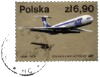
The HTML sets up a standard webpage and links to an external styles.css file. It also imports Google Fonts and Font Awesome. Inside the <body>, the .mail-container is the main card, containing an inner section with an “Air-Mail” label, a postage-stamp image, and placeholder recipient address information. The <br> elements create line breaks within the address.
The CSS controls the card's size, position, colours, fonts, and layout. The .mail-container is 600px wide and 295px high and is centred using margin: 0 auto. Its repeating-linear-gradient() creates the distinctive red, light-blue, and blue diagonal air-mail border, white box-shadow gives the card a raised appearance.
The .inner element creates the light-blue area inside the card and uses the Caveat Google Font to give the address a handwritten appearance. The postage-stamp image is positioned in the top-right corner using absolute positioning. The .tag class similarly positions the blue Air-Mail label near the top-right of the card.
How to Use the Code
To use the code, save the HTML as index.html and the CSS as styles.css in the same folder. Open index.html in a browser to view the design. You can replace the placeholder address, change the postage-stamp image URL, and modify the CSS colours, dimensions, fonts, or positioning to customise the card.
HTML
CSS
PREVIEW
Air-Mail
To
1st line of address
Town name
County/State name
Country
Post/Zip Code